Guide
Ratebit builds your own feed of links from Bluesky and the rest of the ATmosphere, right on your device.
-
01
Install
Get the app from the home page (Linux, Windows and Android).
-
02
Start listening
In Algo → Listener, pick which posts to keep, add a few words to your Watchlist, and press Listen at the top. More on the listener
-
03
Browse your feed
The Feed tab shows the best of what was saved. Follow people you like and hide cards with ✕.
-
04
Rate
Press Rate on a card, or paste a link into the Rate tab, and score it 1–10. High and low ratings both teach your feed, so rate the misses too. Ratings stay private unless you publish them.
-
05
Customize the algo
Your algorithm should be your own, and get better as you tweak it over time. The default, Balanced Mix, is a good starting point. Change it in Algo → Algorithm: start from a ready-made one or write your own.
-
06
Connect an account (optional)
To publish ratings, type your handle in Data and press Connect. Any ATProto account works, for example Bluesky. Login options
-
07
Sync devices (optional)
Ratebit Plus syncs your ratings and settings across devices, end-to-end encrypted. Without it, Ratebit never contacts a Ratebit server.
Docs
Listener
The listener reads new posts as they appear and keeps those with a link that match your rules (Algo → Listener). After a pause it catches up on what it missed.
- Posts in watchlist: posts that mention a watchlist word.
- Posts by subscriptions: everything from accounts you follow.
- Posts by cohort: posts by people who shared links you rated 5+, and other posts of those links.
- All allowed posts: everything with a supported link.
Supported sites are the ones the app can preview: YouTube, Spotify, Bluesky, Instagram, X/Twitter, TikTok, Reddit,
Threads, Pinterest, Wikipedia and the larger Mastodon servers. Short links that hide the post
(vm.tiktok.com, redd.it, pin.it) are skipped.
Watchlist words match whole words, plurals included: go finds "Go tournament",
not "government". photo* matches any word starting with "photo".
Also match by meaning catches posts on your topics without the exact words, using a 90 MB model that runs
on your device. If Hugging Face is blocked, change where it's downloaded from, e.g. to
https://hf-mirror.com/sentence-transformers/all-MiniLM-L6-v2.
Blacklist words keep posts out of your feed.
Account login
Any ATProto account works: Bluesky, another provider or your own server, custom-domain handles included.
- Connect (default): log in on your account's own page in the browser and approve Ratebit. Ratebit never sees your password and can only write its own rating records. Lasts two weeks, then connect again.
- App password: create one in your account settings and use Use an app password instead. Doesn't expire, but grants wider access to your account.
The connection is per device. Published ratings can be unpublished in the Data tab.
Storage
Everything is stored on your device. Ratings are private unless you publish them to the ATmosphere. In Data, choose how long listener captures are kept and press Clean up now to free space; your ratings and the posts of links you rated are always kept.
Algorithm config
Your algorithm is a JS snippet that runs inside
async function(api) { ...your code... }.
It gets an api object and should
return the array of items to show.
Algorithm API
Functions on api:
api.getLatestRatings(limit = 20)
The newest ratings in your database (captured by the listener, and your own), newest first. Up to 1000.
api.getOwnPosts()
Your own ratings, local and published, newest first.
api.getChronologicalRatings(ratingId, maxEarlier = 3, maxLater = 3)
What the same person rated just before and after a given rating, as { previous_ratings, next_ratings }.
api.getSubscriptions()
Accounts you follow, as { did, label } pairs.
api.getPostsByDid(did)
Ratings from one account (its newest 50).
api.getRatingsOfLink(url)
Everyone's ratings of one link (including yours), newest first. Combine with getChronologicalRatings to see what those people shared around it.
api.getBlacklist()
Your blacklist words, lowercased.
api.getWatchlist()
Your watchlist words, same format.
api.mentions(text, word)
Whether text mentions word as a whole word or phrase, ignoring case:
"go" matches "Go is hard" and "goes", but not "government" or "good".
A trailing * matches word beginnings ("photo*" matches "photography").
The listener uses the same rules for your watchlist.
api.tasteScores(items)
The taste score of many feed items at once, in the same order:
each { score, because }, or null for a post with too little text to judge.
Returns null altogether while the embedding model isn't downloaded, so check for that.
Taste score
How much a post is like the links you rated, from -1 to +1.
Every link you rated pulls: a 10 pulls similar posts up with full strength, a 1 pushes them down just as hard, and 5 or 6 hardly count.
A post's score combines the pulls of the rated links most similar to it, so it's positive near things you loved, negative near things you disliked,
and around 0 when nothing you rated is similar (unknown, not bad).
"Similar" means similar in meaning, judged by the same small on-device model as the semantic watchlist: turn on "Also match by meaning" in the Algo tab once to download it (it doesn't have to stay on). The model understands English best. A rated link is described by what other people wrote when they shared it, plus your own tags and review, so links that others shared and that you tagged well make the best examples.
because is the rated link that influenced a score most, as
{ url, rating, similarity }.
Feed items
Every function returns ratings as objects with these fields; return them (or a selection) to show them in your feed.
rating_id— unique id,"<identifier>:<url>"url— the link, withouthttps://identifier— who posted it (a DID, orRatebitfor your local ratings)handle— their handle, if knowntime— when it was posted, unix secondsenjoyment— score from 1 to 10 (listener captures are 10)tags— list of tags; listener captures havefirehose-autopost_text,review_text— the post, and a review if one was writtenis_public— published to the ATmosphere
Widget
Show off the things you like on your website with a Ratebit Widget! It displays links you rated, updating instantly without you having to manage a database.
This is how it can look on your website:
Add it to your site by including the ratebit-widget.js file from the
Github Repo and adding the
<ratebit-shelf> component. Attributes:
handle— your ATproto handletitle— heading shown above the shelflimit— max items to displaymin-score— hide anything rated below thisembed— compact layout when set to true
Public ratings (ATproto)
Publishing writes an
io.ratebit.rating
record to your PDS. It consists of a URL, a score and an optional note. The widget reads it directly,
with no Ratebit server involved.
Algorithms
A list of algorithms you may want to use.
Balanced Mix
defaultThe default. A bit of everything woven together: what was shared around links you rated 8 or higher, your subscriptions, your watchlist, and recent links picked for you. The weights at the top decide the proportions. With the embedding model downloaded, it uses your taste score: posts like links you rated high come first, and posts like links you rated low are left out. Without it, the picks for you are random.
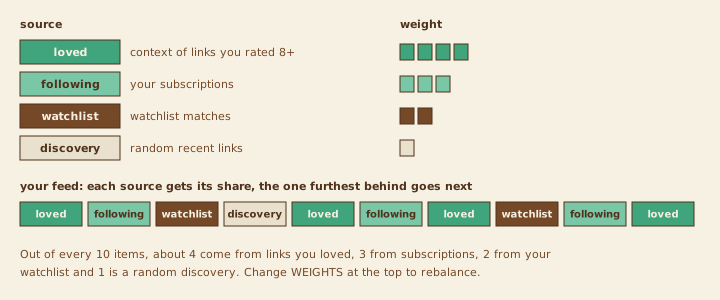
// Balanced Mix: a bit of everything, woven together.
// Context of links you loved, your subscriptions, your watchlist and
// recent links picked for you. Change the weights to taste.
// Once the semantic watchlist's model is downloaded, every post gets a
// taste score from your ratings: posts like links you rated high come
// first, posts like links you rated low are left out.
const WEIGHTS = { loved: 4, following: 3, watchlist: 2, forYou: 1 };
const SIZE = 30;
// Leave out posts at least this much like links you rated low
// (-1 = only near-copies of them, 0 = anything leaning that way)
const LEAVE_OUT_BELOW = -0.1;

const blacklist = await api.getBlacklist();
const own = await api.getOwnPosts();
const rated = new Set(own.map(p => p.url));
const recent = await api.getLatestRatings(300);

// 1. Links you rated 8 or higher: what the other people who shared
//    them shared just before and after (like the Context Feed)
const me = new Set(own.map(p => p.identifier));
const loved = [];
for (const post of own.filter(p => p.enjoyment >= 8).slice(0, 15)) {
  const others = (await api.getRatingsOfLink(post.url)).filter(r => !me.has(r.identifier));
  for (const theirs of others.slice(0, 3)) {
    const around = await api.getChronologicalRatings(theirs.rating_id, 2, 2);
    if (around) loved.push(...around.previous_ratings, ...around.next_ratings);
  }
}

// 2. Newest from your subscriptions
const following = [];
for (const sub of await api.getSubscriptions()) {
  following.push(...(await api.getPostsByDid(sub.did)).slice(0, 5));
}
following.sort((a, b) => b.time - a.time);

// 3. Recent posts mentioning a watchlist word (as a whole word, so "go"
//    doesn't match "government")
const words = await api.getWatchlist();
const watchlist = recent.filter(item => {
  const text = `${item.post_text} ${item.url}`;
  return words.some(w => api.mentions(text, w));
});

// Taste scores for all candidates at once (null without the model)
const candidates = [...loved, ...following, ...watchlist, ...recent];
const scores = await api.tasteScores(candidates);
const taste = new Map(candidates.map((item, i) => [item.rating_id, scores?.[i]?.score ?? 0]));
const byTaste = (a, b) => taste.get(b.rating_id) - taste.get(a.rating_id);

// 4. For you: the recent links that fit your taste best
//    (a random handful while there are no taste scores)
const shuffled = recent.map(item => [Math.random(), item]).sort((a, b) => a[0] - b[0]).map(([, item]) => item);
const forYou = scores ? [...recent].sort(byTaste) : shuffled;

// Best matches first; subscriptions stay newest first
if (scores) {
  loved.sort(byTaste);
  watchlist.sort(byTaste);
}

const ok = (item) =>
  !blacklist.some(w => item.url.toLowerCase().includes(w)) &&
  taste.get(item.rating_id) >= LEAVE_OUT_BELOW;

// Weave: take from each source in proportion to its weight
const sources = Object.entries({ loved, following, watchlist, forYou })
  .map(([name, items]) => ({ items: items.filter(ok), weight: WEIGHTS[name], taken: 0 }));
const seen = new Set(rated);
const feed = [];
while (feed.length < SIZE && sources.some(s => s.items.length)) {
  // the source furthest behind its share goes next
  const next = sources
    .filter(s => s.items.length)
    .sort((a, b) => a.taken / a.weight - b.taken / b.weight)[0];
  const item = next.items.shift();
  if (seen.has(item.url)) continue;
  seen.add(item.url);
  next.taken++;
  feed.push(item);
}
return feed;
Taste
personalThe newest links, ranked purely by your taste score: posts most like the links you rated high come first, posts like the ones you rated low last. Skips your blacklist (in the text or the link), links you've already rated, and repeats of the same link. Needs the embedding model: turn on "Also match by meaning" in the Algo tab once. Until then, it shows the newest links.
// Taste: recent links ranked purely by your taste score.
// Needs the embedding model (Algo tab: turn on "Also match by meaning" once).
const SIZE = 30;

const blacklist = await api.getBlacklist();
const seen = new Set((await api.getOwnPosts()).map(p => p.url)); // skip what you rated
const recent = (await api.getLatestRatings(500)).filter(item => {
  const text = `${item.post_text} ${item.url}`.toLowerCase();
  if (seen.has(item.url) || blacklist.some(w => text.includes(w))) return false;
  seen.add(item.url); // each link once
  return true;
});

const scores = await api.tasteScores(recent);
if (!scores) return recent.slice(0, SIZE); // no model yet: newest first

return recent
  .map((item, i) => ({ item, score: scores[i]?.score ?? 0 }))
  .sort((a, b) => b.score - a.score)
  .slice(0, SIZE)
  .map(({ item }) => item);
Latest Ratings
minimalReturns the newest ratings from the database filled by the listener.
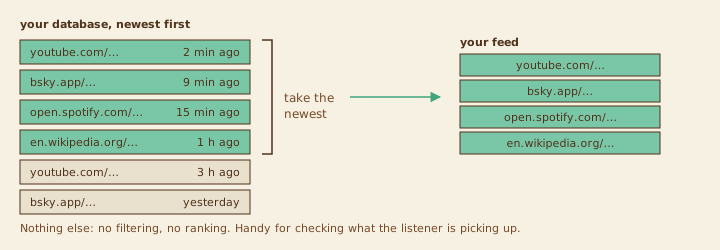
// Returns newest content in the db
return await api.getLatestRatings();
Context Feed
contextFor links you rated, finds the other people who shared the same link and shows what they shared just before and after it: someone who shared a link you liked often shares more you'll like. Skips links you've rated, applies the blacklist, and tops up from your subscriptions to 20 items.
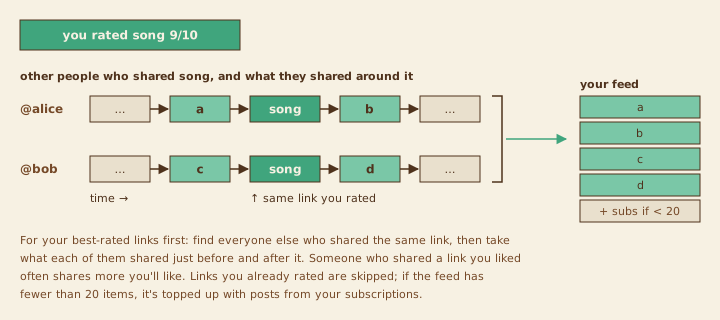
// Context Feed: for links you rated, find the other people
// who shared the same link and show what they shared just before and
// after it. Someone who shared a link you liked often shares more you'll
// like. Skips links you've rated, applies the blacklist, and tops up
// from your subscriptions to 20 items.
const blacklist = await api.getBlacklist();
const own = await api.getOwnPosts();
const me = new Set(own.map(p => p.identifier));
const seen = new Set(own.map(p => p.url));   // don't show what you already rated
const feed = [];
const add = (item) => {
  const url = item.url.toLowerCase();
  if (seen.has(item.url) || blacklist.some(word => url.includes(word))) return;
  seen.add(item.url);
  feed.push(item);
};

// Your best-rated links first, then the newest
const favourites = [...own].sort((a, b) => b.enjoyment - a.enjoyment || b.time - a.time);
for (const post of favourites.slice(0, 30)) {
  const others = (await api.getRatingsOfLink(post.url))
    .filter(r => !me.has(r.identifier));
  for (const theirs of others.slice(0, 5)) {
    const around = await api.getChronologicalRatings(theirs.rating_id, 2, 2);
    if (around) [...around.previous_ratings, ...around.next_ratings].forEach(add);
  }
}

// Fill up from subscriptions
if (feed.length < 20) {
  for (const sub of await api.getSubscriptions()) {
    if (feed.length >= 20) break;
    for (const p of await api.getPostsByDid(sub.did)) {
      if (feed.length >= 20) break;
      add(p);
    }
  }
}
return feed;
Trending
popularLinks that several different people shared recently. Each link scores by how many people posted it, fading with age, so a link five people shared today beats one eight people shared last week. Works best with the listener capturing broadly.
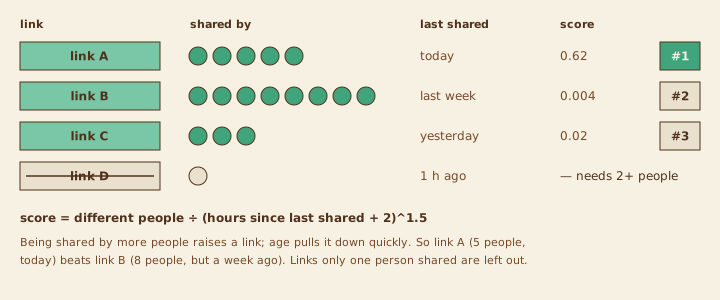
// Trending: links several different people shared recently.
// Each link scores by how many people posted it, fading with age
// (like Hacker News), so a link shared by 5 people today beats one
// shared by 8 people last week.
const blacklist = await api.getBlacklist();
const pool = await api.getLatestRatings(500);

const byUrl = new Map();
for (const item of pool) {
  const url = item.url.toLowerCase();
  if (blacklist.some(word => url.includes(word))) continue;
  const entry = byUrl.get(item.url) ?? { item, people: new Set() };
  entry.people.add(item.identifier);
  if (item.time > entry.item.time) entry.item = item; // show the newest post
  byUrl.set(item.url, entry);
}

const now = Date.now() / 1000;
const score = ({ item, people }) => {
  const ageHours = Math.max(0, now - item.time) / 3600;
  return people.size / Math.pow(ageHours + 2, 1.5);
};

return [...byUrl.values()]
  .filter(e => e.people.size >= 2) // at least two different people
  .sort((a, b) => score(b) - score(a))
  .slice(0, 30)
  .map(e => e.item);
Following
subscriptionsOnly the accounts you subscribed to, newest first. It takes turns between accounts, so one very active account can't fill the whole feed.
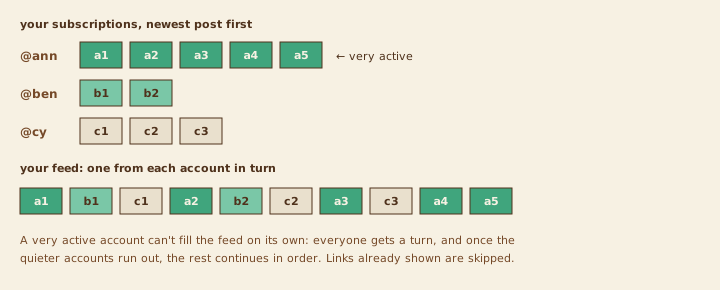
// Following: only accounts you subscribed to, newest first, taking
// turns between accounts so one very active account can't fill the
// whole feed.
const blacklist = await api.getBlacklist();
const allowed = (item) =>
  !blacklist.some(word => item.url.toLowerCase().includes(word));

const subscriptions = await api.getSubscriptions();
const queues = [];
for (const sub of subscriptions) {
  const posts = (await api.getPostsByDid(sub.did))
    .filter(allowed)
    .sort((a, b) => b.time - a.time);
  if (posts.length) queues.push(posts);
}

// Round robin: each account's newest, then each account's next, ...
const feed = [];
const seenUrls = new Set();
while (feed.length < 40 && queues.some(q => q.length)) {
  for (const q of queues) {
    const item = q.shift();
    if (item && !seenUrls.has(item.url)) {
      seenUrls.add(item.url);
      feed.push(item);
    }
  }
}
return feed;
Watchlist
focusedRecent posts that mention one of your watchlist words (as whole words, so "go" doesn't match "government") in the text or the link. Posts matching more of your words rank higher.
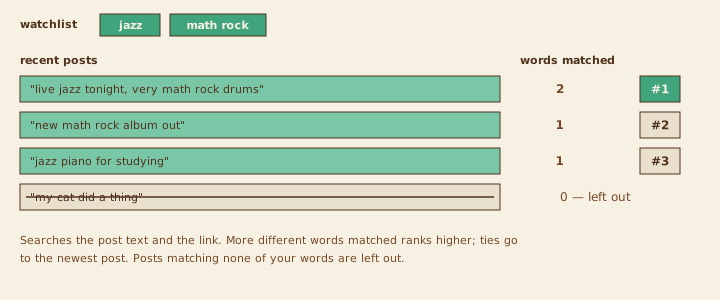
// Watchlist: recent posts that mention one of your watchlist words
// (as whole words) in the post text or the link. The more different words a post
// matches, the higher it ranks; ties go to the newest.
const watchlist = await api.getWatchlist();
if (watchlist.length === 0) return [];
const blacklist = await api.getBlacklist();

const hits = [];
for (const item of await api.getLatestRatings(500)) {
  const text = `${item.post_text} ${item.review_text} ${item.url}`.toLowerCase();
  if (blacklist.some(word => text.includes(word))) continue;
  const matched = watchlist.filter(word => api.mentions(text, word)).length;
  if (matched > 0) hits.push({ item, matched });
}

const seenUrls = new Set();
return hits
  .sort((a, b) => b.matched - a.matched || b.item.time - a.item.time)
  .map(h => h.item)
  .filter(item => !seenUrls.has(item.url) && seenUrls.add(item.url))
  .slice(0, 40);
Fresh & Diverse
discoveryThe newest links, but at most 2 from the same person and 3 from the same website, and nothing you've already rated. Change the two limits at the top to taste.
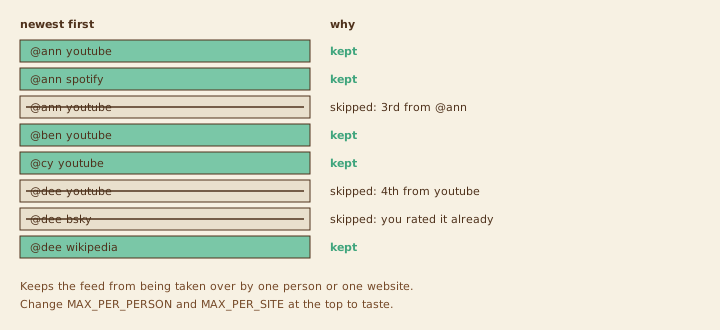
// Fresh & Diverse: the newest links, but at most 2 from the same
// person and 3 from the same website, skipping links you've already
// rated yourself. Good for browsing without one source taking over.
const MAX_PER_PERSON = 2;
const MAX_PER_SITE = 3;

const blacklist = await api.getBlacklist();
const alreadyRated = new Set((await api.getOwnPosts()).map(p => p.url));
const site = (url) => url.replace(/^(https?:\/\/)?(www\.|m\.)?/, '').split(/[/?]/)[0];

const perPerson = new Map();
const perSite = new Map();
const seenUrls = new Set();
const feed = [];

for (const item of await api.getLatestRatings(300)) {
  const url = item.url.toLowerCase();
  if (blacklist.some(word => url.includes(word))) continue;
  if (alreadyRated.has(item.url) || seenUrls.has(item.url)) continue;

  const p = perPerson.get(item.identifier) ?? 0;
  const s = perSite.get(site(url)) ?? 0;
  if (p >= MAX_PER_PERSON || s >= MAX_PER_SITE) continue;

  perPerson.set(item.identifier, p + 1);
  perSite.set(site(url), s + 1);
  seenUrls.add(item.url);
  feed.push(item);
  if (feed.length >= 30) break;
}
return feed;